> ## Documentation Index
> Fetch the complete documentation index at: https://getkoala.com/docs/llms.txt
> Use this file to discover all available pages before exploring further.
# Slack Alerts
> Set up real-time alerts when your prospects are showing buying intent, directly in Slack.
## What is a Slack Alert?
A Slack Alert sends one or more Intent Signals to a Slack channel. Each channel can also have an Audience as a filter, so that only updates about certain sets of visitors or accounts go to that Slack channel.
## What do the Slack messages reps receive look like?
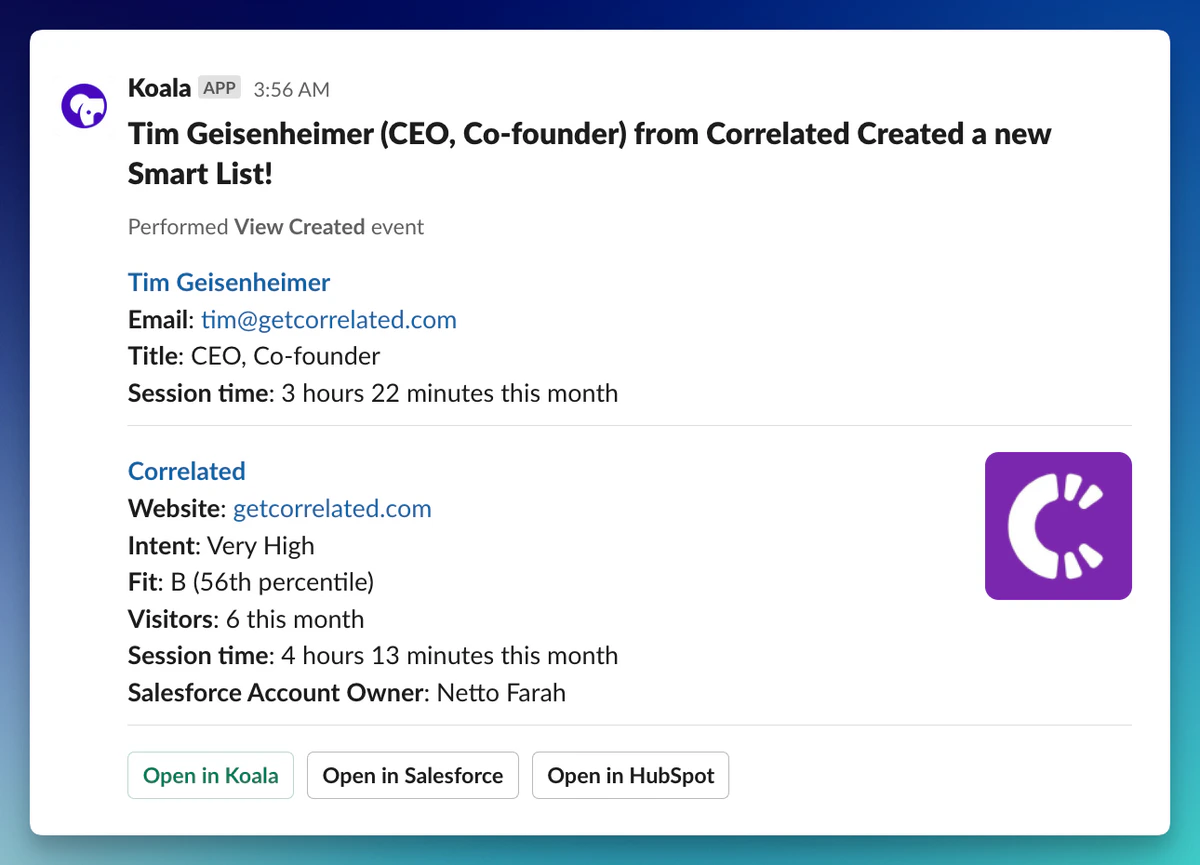 *Note: there is quite a bit of message customizability, but the above is a "default" template.*
## How do I create, edit, and delete Slack Alerts?
In order to use Slack Alerts, you'll first need to connect your Slack workspace to Koala. Read more about the Slack integration.
### Intent Signal home
[https://app.getkoala.com/goto/signals](https://app.getkoala.com/goto/signals)
### Create an Intent Signal
...by clicking "New Intent Signal" in the upper right.
### Read/Edit an Intent Signal
...by clicking on the Intent Signal in the middle.
### Delete an Intent Signal
...by clicking the `...` menu within an Intent Signal.
*Note: there is quite a bit of message customizability, but the above is a "default" template.*
## How do I create, edit, and delete Slack Alerts?
In order to use Slack Alerts, you'll first need to connect your Slack workspace to Koala. Read more about the Slack integration.
### Intent Signal home
[https://app.getkoala.com/goto/signals](https://app.getkoala.com/goto/signals)
### Create an Intent Signal
...by clicking "New Intent Signal" in the upper right.
### Read/Edit an Intent Signal
...by clicking on the Intent Signal in the middle.
### Delete an Intent Signal
...by clicking the `...` menu within an Intent Signal.